

Most websites don’t have a traffic problem. They have a conversion problem. You can spend weeks improving rankings, publishing content, and building links, but if visitors still bounce without taking action, the growth engine stays stuck.
That is why a website conversion rate audit checklist matters. It helps you spot the friction points that quietly kill leads, demo requests, purchases, and newsletter signups. If you run an agency, manage a brand site, or freelance for clients, this checklist gives you a practical way to find quick wins without needing a huge dev budget.
Why conversion audits matter
A conversion audit shows you why people are not converting, not just where they are dropping off. That distinction matters because the fix is often not “more traffic.” It may be better messaging, clearer calls to action, faster load times, or fewer form fields.
For teams balancing SEO, AI visibility, and lead generation, audits also help connect the dots between rankings and revenue. A page can perform well in search and still fail at the moment that counts.
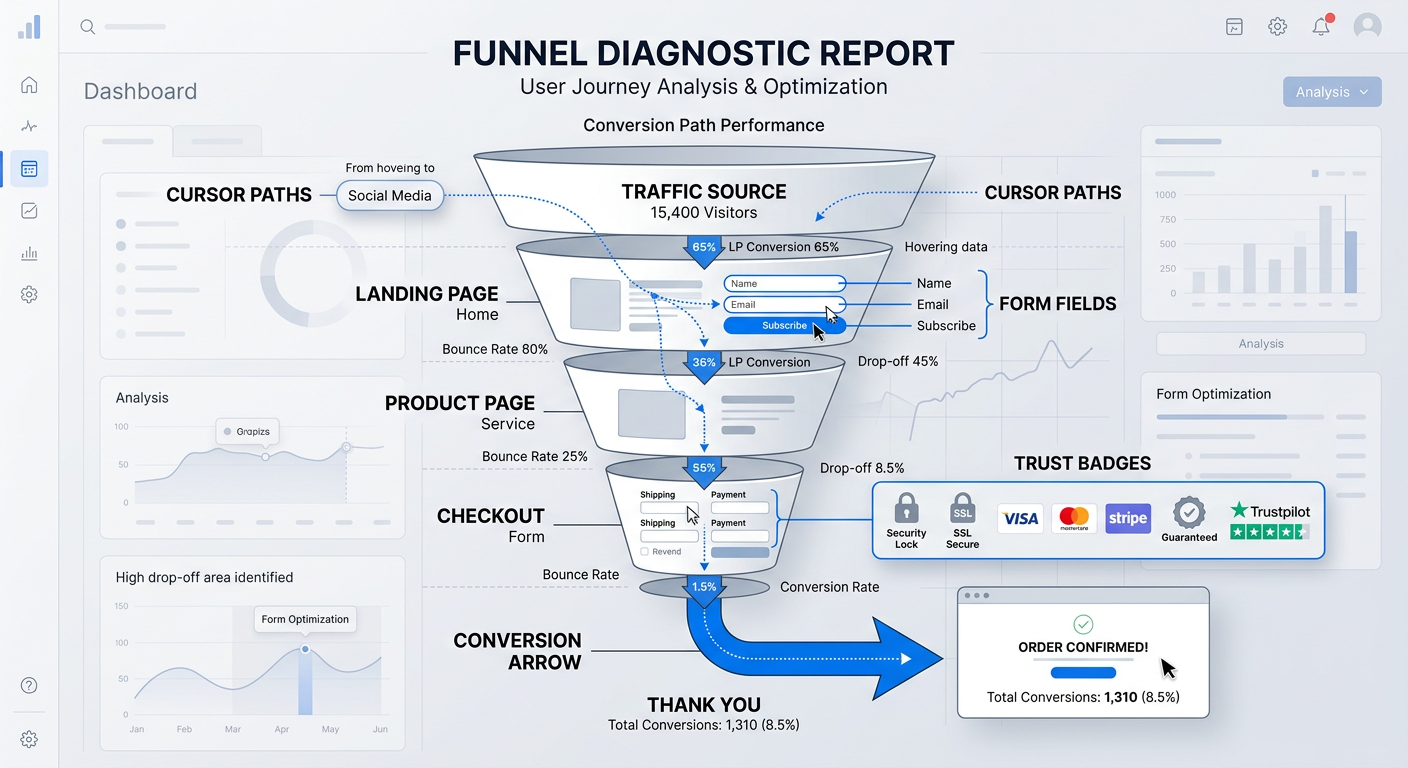
Website conversion rate audit checklist
1. Check your primary conversion goal on every key page
Every important page should have one clear job. If a landing page pushes users toward five different actions, it usually weakens all of them. Decide whether the page is meant to generate leads, book calls, drive purchases, or capture email signups.
2. Review headline clarity and message match
Your headline should instantly confirm the visitor is in the right place. If someone clicks from Google, a blog post, or an AI answer and lands on a page that feels disconnected, they leave. Make sure the headline matches the search intent and the promise of the ad, link, or snippet.
3. Audit the call to action
Your CTA should be easy to find, specific, and repeated where it makes sense. “Get Started” is fine, but “Book Your Free Audit” or “See Your Growth Opportunities” often performs better because it reduces ambiguity. Check button color, placement, contrast, and surrounding copy.
4. Simplify forms aggressively
Long forms kill conversions faster than most teams expect. Remove unnecessary fields, shorten labels, and only ask for what you truly need. If you need more detail later, collect it after the first conversion.
5. Improve page speed and Core Web Vitals
Slow pages create friction before users even read your pitch. If key landing pages feel sluggish on mobile, your conversion rate can suffer even when traffic quality is strong. Run performance checks and remove obvious bottlenecks like oversized images, too many scripts, and bulky third-party tools.
6. Make trust visible
People rarely convert from confidence alone, they convert from proof. Add testimonials, client logos, case studies, reviews, security signals, guarantees, and clear contact details. If your audience is agency buyers or B2B leads, trust elements matter even more because the perceived risk is higher.
7. Check mobile usability first
A large share of visitors will see your site on a phone, so mobile conversion is not optional. Test button spacing, text size, sticky headers, form usability, and tap targets. If users have to pinch, zoom, or scroll endlessly, your funnel is leaking.
8. Remove distractions near conversion points
Navigation, excess links, competing offers, and sidebar clutter can pull attention away from the next step. On high-intent pages, simplify the layout and keep the focus on the conversion action. Less friction often beats more design flair.
9. Review content for objection handling
Good pages answer the silent questions people are already asking. How much does it cost? How long does it take? Who is this for? What happens next? If your copy does not address objections, users hesitate and leave.
10. Compare top-performing and underperforming pages
Look for patterns in the pages that convert best. Maybe they have shorter forms, stronger social proof, clearer offers, or more direct headlines. Use those patterns as a template for weaker pages instead of guessing what might work.
11. Check analytics and behavior data
Use analytics, scroll depth, heatmaps, and session recordings to see where users stall. Numbers tell you what happened, while behavior tools help explain why. This is especially useful for agencies running content, SEO, and conversion audits together.
12. Test one change at a time
Do not redesign everything at once. Prioritize the most obvious friction point, launch one improvement, and measure the result. Small, focused experiments are easier to attribute and easier to repeat.
Quick-win priorities for small teams
If your team has limited dev resources, start here first:
- Clarify the primary CTA on high-value pages
- Shorten forms
- Add one strong trust signal above the fold
- Improve mobile spacing and button usability
- Speed up your slowest landing pages
- Rewrite weak headlines to better match intent
These fixes are often faster than full redesigns and can create meaningful lift without a major rebuild.
How to turn audit findings into revenue
A conversion audit only works if it leads to action. Group findings into three buckets: easy fixes, medium-effort fixes, and bigger structural changes. Then assign each item a business impact estimate so your team knows what to handle first.
If you are an agency, this is also where your reporting gets more valuable. Clients care less about abstract UX notes and more about the path from insight to leads.
FAQ
How often should I run a conversion rate audit?
A quarterly review is a good baseline for most sites. If you launch new pages, traffic spikes, or change offers often, review key pages monthly.
What pages should I audit first?
Start with pages that already get traffic and have a conversion goal, such as service pages, landing pages, pricing pages, and top blog posts with strong intent.
Do I need a developer to improve conversions?
Not always. Many improvements, like clearer copy, simpler forms, better CTAs, and stronger trust signals, can be handled without development help.
What is the biggest conversion mistake websites make?
Unclear messaging is one of the biggest. If visitors cannot tell what you do, who it is for, and what to do next, they usually leave.
Can SEO pages convert well too?
Yes. In fact, SEO pages can convert very well when they align with intent and include a clear next step. The key is to avoid treating content and conversion as separate goals.
How do I know which changes worked?
Track conversions before and after each change. Use analytics and, when possible, A/B testing to confirm the lift came from the specific update.
Grow conversions without rebuilding everything
You do not need a full redesign to get better results. Start with the highest-friction pages, fix the biggest blockers, and keep the process simple. That is how small improvements turn into real lead growth over time.
If you want a smarter way to improve SEO, AI visibility, and conversions together, explore Auditsky for a more efficient audit workflow.