
Skyrocket your rankings with a free SEO website audit.
How it works: Enter your website and keyword to get a free instant SEO Website audit that shows exactly how to boost rankings and increase organic traffic.
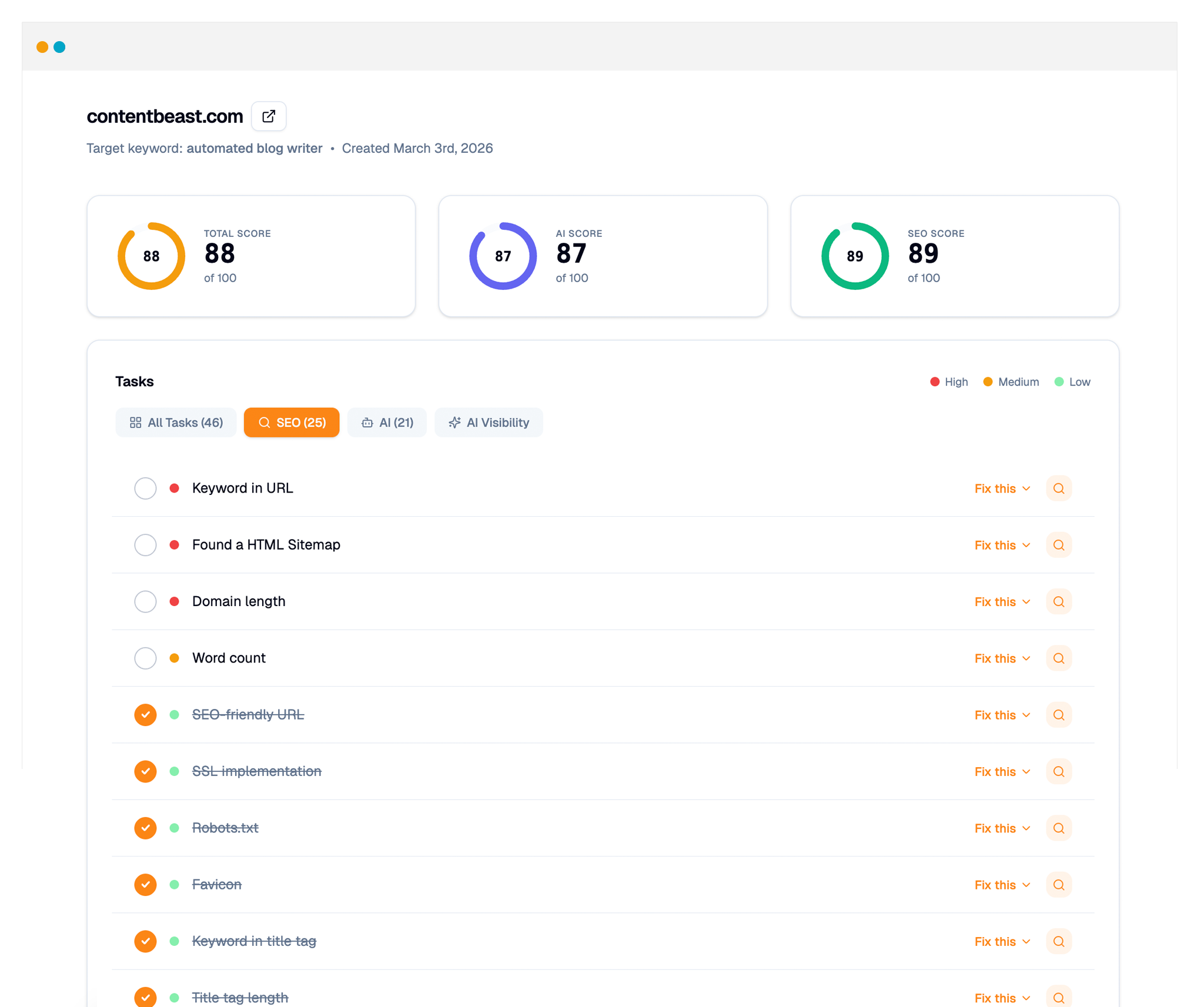
Who is Auditsky for?
Built for both website owners and digital marketing agencies.
Website Owners

Drive more traffic, leads and sales to your website by improving your Google rankings and AI mentions.
- Improve Your SEO
- Increase AI Mentions
- Keyword Recommendations
- Shareable Reports
- Progress Tracking
Agencies

- Embed Audit Tools on Your Site
- Generate Unlimited Leads
- Share Audits with Prospects
- CRM
- White-Label Everything
SEO Signals
What SEO signals does Auditsky audit?
You’re not getting a generic checklist. You’re getting a tailored report that highlights SEO issues and growth opportunities.
SEO-friendly URL
Clean, readable URLs that include relevant keywords help both users and search engines understand what a page is about before they even click. Avoid long strings of numbers or random characters — instead, use short, descriptive slugs that reflect the page content. A well-structured URL builds trust, improves click-through rates, and contributes to stronger overall rankings.
Hyphens instead of underscores
When separating words in a URL, always use hyphens rather than underscores. Search engines like Google treat hyphens as word separators, making it easier to identify individual keywords within your URL. Underscores, on the other hand, are treated as connectors — meaning “keyword_example” is read as one word, not two, which can hurt your SEO performance.
Proximity to top-level domain
The closer a keyword appears to the root domain in a URL, the more SEO weight it carries. For example, a keyword in the domain itself or at the first subfolder level is given more significance than one buried several levels deep. Keeping your site architecture shallow and keyword-rich near the top of the URL structure signals stronger relevance to search engines.
Keyword placement in title tag
Placing your primary keyword at or near the beginning of your title tag is one of the most impactful on-page SEO practices. Search engines scan titles left to right and give more weight to words that appear earlier. Beyond rankings, front-loading keywords makes your titles more compelling in search results, which can improve click-through rates and drive more organic traffic.
Title tag length
Title tags that exceed 70 characters are often truncated in search engine results pages, cutting off important information and reducing their effectiveness. Aim for titles between 50–70 characters to ensure they display in full. A well-crafted, concise title not only fits within display limits but also clearly communicates the page’s value proposition to potential visitors scanning the results.
Meta description with keyword
Including your target keyword naturally in your meta description helps reinforce relevance and can lead to bold highlighting in search results when it matches a user’s query. While meta descriptions are not a direct ranking factor, they play a significant role in click-through rates. A compelling description that incorporates the keyword acts as a mini-ad for your page and encourages more users to click.
Description length
Meta descriptions longer than 160 characters are typically truncated by search engines, leaving your message incomplete. Keeping descriptions within this limit ensures your full value proposition is visible in search results. Write concisely and purposefully — every word should serve a reason, whether that’s to communicate a benefit, include a keyword, or prompt the user to take action.
Alt tags present
Alt tags describe the content of images to search engines and assistive technologies used by visually impaired users. Without alt tags, search engines cannot interpret your images, which means missed opportunities for image search visibility and lost context for the surrounding content. Every meaningful image on your page should have a descriptive, relevant alt attribute to maximize both SEO and accessibility.
Keyword in alt tags
Including your target keyword in image alt text sends additional relevance signals to search engines and improves your chances of appearing in image search results. This is especially valuable for product pages and visually-driven content. Keep alt tags descriptive and natural — don’t force keywords in awkwardly, but do make sure they appear where the image content genuinely supports it.
Keyword in image filenames
Before uploading images, rename files to include descriptive keywords rather than generic names like “IMG_4892.jpg.” A filename like “best-running-shoes-2024.jpg” provides useful context to search engines and improves your image’s chances of ranking in image search. Descriptive filenames complement alt tags and contribute to the overall relevance signals that search engines use to understand and rank your content.
Proper headings structure
Using headings in the correct hierarchical order — H1 for the main title, H2 for major sections, H3 for subsections — helps search engines map your content structure and understand topic relationships. A well-organized heading hierarchy also improves readability for users, making it easier to scan the page. Only one H1 should exist per page, and each level should nest logically beneath its parent.
Keywords in headings
Incorporating your primary and secondary keywords into heading tags reinforces your page’s topic focus and signals relevance to search engines. H1 and H2 tags in particular carry strong SEO weight. Including keywords in headings doesn’t mean stuffing them — use natural, reader-friendly language that also happens to include the terms people are searching for. This balances SEO value with a positive user experience.
Word count
Longer, more comprehensive content tends to rank better because it has a higher likelihood of fully satisfying a searcher’s query. Pages with 2,000 or more words signal depth and authority to search engines, and they often attract more backlinks and dwell time. However, length alone isn’t the goal — every word should add value. Thin content padded to hit a word count will underperform against focused, informative writing.
Keyword frequency
Your target keyword should appear naturally throughout the page — in the title, introduction, body, and conclusion — without being forced or repeated excessively. Keyword stuffing is penalized by search engines and makes content harder to read. Aim for a natural density that flows well for human readers while still providing clear signals about the page’s topic. Supporting synonyms and related terms also help reinforce relevance.
Keyword in first 100 words
Mentioning your primary keyword early in the body content — ideally within the first 100 words — helps search engines quickly confirm what the page is about. This early placement reinforces the signals already sent by your title tag and URL. It also reassures readers who land on the page that they’ve found what they were looking for, reducing bounce rates and increasing engagement.
Text formatting with keywords
Using bold or italic formatting to highlight keywords and key phrases can draw attention to important terms and may provide a subtle relevance signal to search engines. More importantly, formatting improves scannability — readers naturally gravitate toward bolded text when skimming a page. Use formatting intentionally and sparingly to emphasize genuinely important concepts, not just to try to game rankings.
Anchor text optimization
The clickable text used for internal and external links should be descriptive and relevant to the destination page, rather than generic phrases like “click here” or “read more.” Descriptive anchor text provides search engines with additional context about linked pages and helps distribute link equity more meaningfully across your site. Well-optimized anchor text also improves usability, giving users a clear expectation of what they’ll find when they click.
Sitemap HTML
An HTML sitemap is a page on your website that lists links to all major sections and pages in a structured, human-readable format. It acts as a navigation aid for visitors who can’t find what they’re looking for through the main menu. It also gives search engine crawlers another way to discover and index pages that might be harder to reach through normal navigation paths.
Sitemap XML
An XML sitemap is a machine-readable file submitted to search engines that lists all the URLs on your site along with metadata like last modified dates and priority levels. It helps search engines discover and index your content more efficiently, especially for large sites or pages that aren’t well-linked internally. Submitting your XML sitemap through Google Search Console ensures crawlers stay up to date with your latest content.
Page load time
Page speed is a confirmed Google ranking factor and has a direct impact on user experience. Slow-loading pages lead to higher bounce rates, lower engagement, and reduced conversions. Google’s Core Web Vitals metrics specifically measure loading performance, and pages that score well are rewarded in rankings. Optimizing images, leveraging browser caching, and minimizing render-blocking resources are among the most effective ways to improve load time.
HTTP requests
Every element on a webpage — images, scripts, stylesheets, fonts — requires a separate HTTP request to load. The more requests a page makes, the longer it takes to fully render, which negatively impacts both user experience and SEO. Reducing HTTP requests by combining files, using CSS sprites, lazy loading images, and eliminating unnecessary scripts can significantly speed up your page and improve Core Web Vitals scores.
HTML validation
Valid, well-structured HTML ensures your pages render consistently across different browsers and devices. Errors in your HTML code can cause rendering issues that confuse search engine crawlers, prevent proper indexing, and degrade the user experience. Running your pages through the W3C Markup Validation Service can reveal hidden errors that, once fixed, help search engines parse and understand your content more accurately.
Inline CSS usage
Embedding CSS styles directly within HTML elements adds unnecessary weight to your HTML files and makes it harder to maintain consistent styling across a site. Separating CSS into external stylesheets reduces file sizes, improves caching efficiency, and keeps your HTML cleaner and easier for search engines to parse. Minimizing inline styles is a simple technical improvement that contributes to faster load times and better overall site performance.
Viewport meta tag
The viewport meta tag tells browsers how to scale and display your page on different screen sizes. Without it, mobile devices often render desktop versions of your site at a reduced scale, resulting in a poor user experience. Since Google uses mobile-first indexing, having the correct viewport configuration is essential for both mobile usability and SEO performance. It’s one of the foundational elements of a mobile-friendly website.
Mobile-friendly rendering
With Google’s mobile-first indexing, the mobile version of your site is now the primary version evaluated for ranking purposes. A responsive design that adapts fluidly to any screen size ensures all users — regardless of device — have a positive experience. Mobile-friendliness affects bounce rates, session duration, and conversion rates, all of which indirectly influence your SEO performance. Google’s Mobile-Friendly Test tool can quickly identify any issues.
Apple icon inclusion
Adding an Apple touch icon ensures your site displays a branded, high-quality icon when users save it to their home screen on iOS devices. Without it, devices will either use a screenshot of the page or a generic placeholder, which looks unprofessional and reduces brand recognition. While not a direct ranking factor, a polished mobile presence contributes to user trust and engagement, which do influence SEO over time.
Domain length
Shorter domain names are generally easier for users to remember, type accurately, and share verbally. Long or complex domain names increase the likelihood of typos and make it harder for your brand to spread through word-of-mouth. While domain length isn’t a direct ranking factor, memorable domains tend to generate more direct traffic and return visits — both positive signals that search engines use to evaluate site quality and authority.
Keyword in domain
Having your primary keyword in your domain name can provide a minor SEO advantage by reinforcing topical relevance. It also helps users immediately understand what your site is about, which can improve click-through rates in search results. While this signal carries less weight than it once did, it still contributes to overall brand-keyword alignment and can be particularly useful for niche or local businesses competing in specific markets.
SSL implementation
Switching from HTTP to HTTPS by implementing an SSL certificate is both a security best practice and a confirmed Google ranking factor. HTTPS encrypts data transmitted between users and your server, protecting sensitive information and building visitor trust. Browsers now display security warnings for non-HTTPS sites, which can drive users away before they even engage with your content. A secure site is foundational to both credibility and search performance.
Robots.txt
The robots.txt file sits at the root of your domain and tells search engine crawlers which pages or sections of your site they are allowed or not allowed to index. Properly configured, it prevents crawlers from wasting resources on low-value pages like admin areas, duplicate content, or staging environments. Misconfigured robots.txt files can accidentally block important pages from being indexed, so regular audits are essential to maintain healthy crawl coverage.
Favicon
A favicon is the small icon that appears in browser tabs, bookmarks, and sometimes in search results. While it has no direct impact on rankings, a properly implemented favicon improves brand recognition and creates a more professional, polished appearance across all touchpoints. Sites without favicons can appear unfinished or untrustworthy, which may subtly influence user behavior and engagement signals that do affect SEO.
Canonicalization
Canonical tags tell search engines which version of a URL is the “official” one when duplicate or similar content exists across multiple URLs. Without proper canonicalization, search engines may split ranking signals across multiple versions of the same page, diluting its authority. Common issues include www vs. non-www, HTTP vs. HTTPS, and trailing slash variations. A canonical tag consolidates these signals, ensuring all SEO value is attributed to a single preferred URL.
SEO Audit FAQs
How do we audit your website for SEO?
What is a free SEO website audit tool?
How does the SEO audit work?
What does the audit check?
How long does it take to get results?
Do I need technical skills to use Auditsky?
Nope. Just enter your URL and keyword. We’ll instantly generate an easy-to-understand audit, no SEO or coding experience needed.
Is the audit free?
Yes, you can run a free SEO website audit with Auditsky in seconds.
Can I share the audit results with my team or clients?
Yes. If you’re logged in, you’ll get a private share link you can send to clients, teammates, or stakeholders.
How often should I run an SEO website audit?
We recommend running an audit at least once a week, or more frequently if you’re making regular updates to your site.
Is the SEO audit really free?
Will this help improve my rankings?
Ready to 10x your SEO leads?
Auditsky is 100% free to try, and you can cancel anytime. If you love it, keep using it.
Cancel anytime