A technical SEO audit is one of the fastest ways to uncover hidden growth blockers on a SaaS site. If your pages are slow, hard to crawl, poorly linked, or full of index bloat, you can lose rankings even when your content is strong.
That’s why a technical SEO audit checklist for SaaS matters so much. SaaS websites usually have complex architecture, product pages, docs, pricing pages, integrations, blog content, and sometimes app subdomains, all of which can create technical friction if you don’t check them carefully.
Why SaaS Sites Need a Different SEO Audit Approach
SaaS sites are not like simple brochure websites. They often have multiple page types, dynamic content, and conversion paths that depend on performance, trust, and clean indexation.
Google’s guidance on crawling, indexing, links, and page experience makes it clear that technical issues can affect whether your pages are discovered, understood, and shown in search. Core Web Vitals also remain important for user experience, with Google recommending good performance on LCP, INP, and CLS. (developers.google.com)
For SaaS teams, the goal is simple: make sure search engines can crawl the right pages, ignore the wrong ones, and deliver a fast, stable experience to users who are ready to sign up, request a demo, or start a trial.
Technical SEO Audit Checklist for SaaS
1. Confirm Crawlability
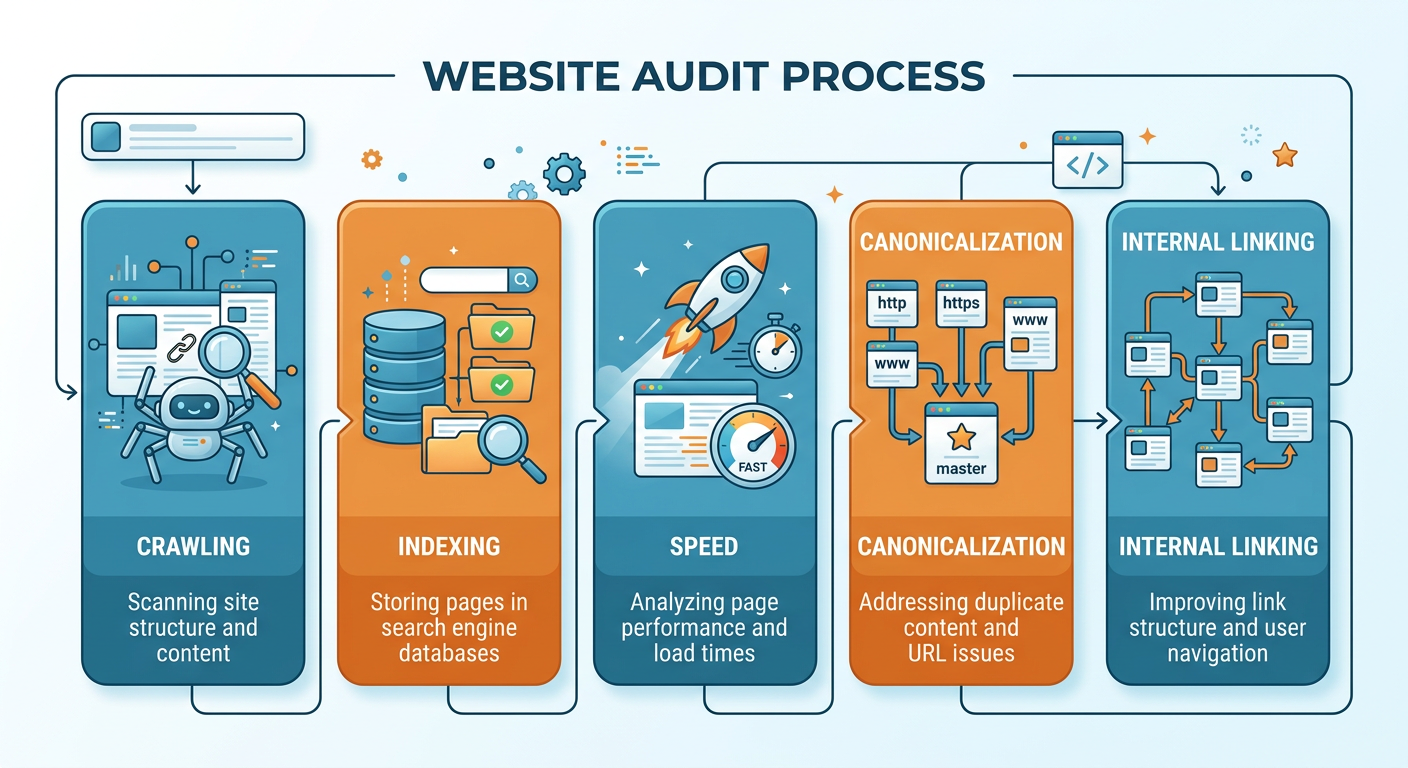
Start by checking whether search engines can access your most important pages. That includes homepage, pricing, feature pages, comparison pages, blog posts, docs, and key landing pages.
Look for blocked resources, broken internal links, crawl traps, and areas hidden behind overly complex navigation. Google recommends making links crawlable so search engines can find your pages through normal HTML links. (developers.google.com)
2. Review Indexation Rules
Your robots.txt, meta robots tags, canonicals, and redirects should all work together. If they conflict, you can accidentally tell search engines to ignore pages that should rank, or index pages that should stay out of the results.
A practical SaaS rule is this: only index pages that support demand capture, product education, or brand trust. Everything else should have a deliberate reason to exist. (developers.google.com)
3. Audit Canonical Tags
Canonical tags help search engines understand which version of a page should be treated as the primary one. This is especially useful for SaaS sites with duplicate or near-duplicate pages, such as UTM versions, parameterized URLs, or localized variants.
Ahrefs notes that duplicate content without proper canonical handling can create indexation issues. That’s a common problem on SaaS websites with lots of similar pages. (help.ahrefs.com)
4. Check Redirects and Status Codes
Find redirect chains, broken pages, 4xx errors, and unnecessary 302s. SaaS sites often have old product pages, retired integrations, and migrated blog URLs that still attract links or traffic.
A clean redirect map protects equity and helps users land where they expected. It also keeps crawl efficiency from getting wasted on dead ends. (ahrefs.com)
5. Evaluate Site Architecture
Your site structure should make the most important pages easy to reach in a few clicks. For SaaS, that usually means product, pricing, use cases, solutions, comparisons, integrations, docs, and blog content.
If important pages are buried too deep, they can receive less internal link value and weaker crawl attention. In simple terms, search engines should be able to understand your hierarchy at a glance. (developers.google.com)
6. Fix Internal Linking Gaps
Internal linking is one of the most overlooked technical SEO levers. It helps distribute authority, surface important pages, and connect content clusters around product categories or customer pain points.
Ahrefs and Google both emphasize the importance of crawlable links and clear anchor text. On a SaaS site, that means linking from blog content to solution pages, from docs to product pages, and from comparison posts to conversion pages where relevant. (developers.google.com)
7. Remove Orphan Pages
Orphan pages are pages with no internal links pointing to them. They are easy to forget, especially after migrations, content launches, or campaign updates.
For SaaS companies, orphan pages often include old webinars, obsolete docs, archived feature pages, and forgotten landing pages. If search engines can’t find them through internal links, their value drops fast. (help.ahrefs.com)
8. Improve Core Web Vitals
Check LCP, INP, and CLS across your core templates, not just the homepage. Product pages, pricing pages, and sign-up flows should load quickly and stay stable.
Google recommends aiming for LCP within 2.5 seconds, INP under 200 milliseconds, and CLS below 0.1 for a good user experience. That matters because SaaS visitors often compare multiple vendors before converting. (developers.google.com)
9. Review Mobile Experience
Most SaaS traffic now comes from mobile at some stage of the buyer journey, even if final conversion happens on desktop. Your site should be easy to scan, tap, and navigate on a small screen.
Check font sizes, button spacing, sticky elements, modal behavior, and the responsiveness of pricing tables or comparison sections. A page can be technically indexable and still fail users if it feels clunky on mobile.
10. Audit JavaScript Rendering
Many SaaS sites rely heavily on JavaScript for UI, demos, pricing calculators, and product previews. That can create rendering delays or content that is harder for search engines to process.
Make sure critical content is available in the rendered HTML and not hidden behind scripts that load too late. If search engines cannot see core copy, internal links, or structured data, visibility can suffer.
11. Check Structured Data
Structured data helps search engines better understand your pages. For SaaS, common opportunities include organization, breadcrumbs, product pages, FAQs, reviews, and articles.
Use structured data where it truly adds clarity. Don’t mark up content that does not exist on the page, and keep it aligned with the visible page content.
12. Audit Duplicate Content
Duplicate or similar content is common on SaaS sites because many pages are template-driven. Feature pages, location pages, integration pages, and comparison pages can start to look too alike.
Ahrefs points out that duplicates with weak canonical handling can cause indexation problems. Your audit should identify pages that need consolidation, canonicals, noindex tags, or rewritten copy. (help.ahrefs.com)
13. Check HTTPS and Mixed Content
Your entire site should run cleanly on HTTPS. Mixed content, insecure assets, or inconsistent protocol handling can create trust issues and technical noise.
This is especially important for SaaS because users are sharing personal or business data through forms, trials, and demos. Security signals matter to both trust and user confidence. (help.ahrefs.com)
14. Validate Hreflang for International SaaS
If you serve multiple countries or languages, hreflang errors can cause the wrong page to rank in the wrong market. That can hurt both search visibility and user experience.
Check language codes, regional targeting, canonical alignment, and return links between equivalents. International SaaS SEO needs precision, not guesswork.
15. Monitor Logs, Search Console, and Trends
A checklist is useful, but the best audits use ongoing data. Review crawl logs, Search Console coverage, Core Web Vitals, and traffic trends to see whether fixes are actually working.
If traffic is dropping on pages that should perform well, compare technical changes with performance data. That helps you separate SEO issues from content, demand, or product-market fit issues.
How to Prioritize Fixes in a SaaS SEO Audit
Not every issue deserves the same urgency. Focus first on problems that affect crawling, indexing, and conversion pages.
A simple priority order looks like this:
- Pages blocked from crawling or indexing by mistake
- Broken pages, redirect chains, and canonical conflicts
- Poor internal linking to money pages
- Core Web Vitals and mobile usability issues
- Duplicate content and weak site architecture
- Structured data and international SEO refinements
This order helps small teams get the biggest SEO lift without needing a massive development sprint.
Common SaaS SEO Mistakes to Avoid
Launching pages without internal links
A new pricing page or feature page should never be isolated. If nothing links to it, discovery and authority both suffer.
Letting old campaigns live forever
Temporary landing pages, seasonal offers, and webinar pages can create index bloat if you never clean them up.
Ignoring subdomains and app areas
Docs, help centers, and app subdomains can have a major SEO impact. Decide what should be indexed and what should stay private.
Chasing speed without fixing structure
Performance helps, but fast pages with poor architecture still underperform. Technical SEO works best when speed, crawlability, and internal linking support each other.
FAQ
How often should a SaaS site run a technical SEO audit?
At minimum, run a full audit quarterly and spot checks monthly. If you launch pages often or ship product updates frequently, check technical health more often.
What pages matter most in a SaaS technical audit?
Focus on pricing pages, product pages, feature pages, comparison pages, docs, blog posts, and conversion landing pages. These usually carry the highest mix of traffic and revenue value.
What is the biggest technical SEO risk for SaaS sites?
The biggest risk is usually indexation confusion. Too many similar pages, weak canonicals, or bad internal linking can stop your best pages from performing.
Do Core Web Vitals still matter for SaaS SEO?
Yes. Google continues to recommend good Core Web Vitals as part of a strong page experience. Fast, stable pages also help conversion rates, which makes the impact even bigger for SaaS. (developers.google.com)
Should SaaS companies noindex blog posts?
Usually no. Blog posts often support discovery and education, so they can be valuable SEO assets. The better move is to improve quality, internal linking, and content relevance.
Can a small SaaS team do this without a developer?
Yes, at least the first pass. You can identify crawl issues, redirect problems, missing links, duplicate pages, and performance bottlenecks before asking for dev help.
Take the Next Step With a Cleaner Site
If your SaaS site is underperforming, don’t guess. Run a focused technical SEO audit, fix the highest-impact issues first, and keep improving the pages that matter most for sign-ups and demos.
If you want a faster way to spot problems, improve visibility, and turn technical issues into growth opportunities, take a look at AuditSky. It’s a practical way to uncover SEO blockers and build a stronger path to organic leads.
Conclusion
A strong SaaS SEO strategy starts with clean technical foundations. When crawlability, indexation, internal linking, speed, and page structure are working together, your content has a much better chance to rank and convert.
Use this technical SEO audit checklist for SaaS as your baseline, then keep refining it as your product, pages, and content library grow. The sites that win are usually the ones that remove friction first and scale second.