
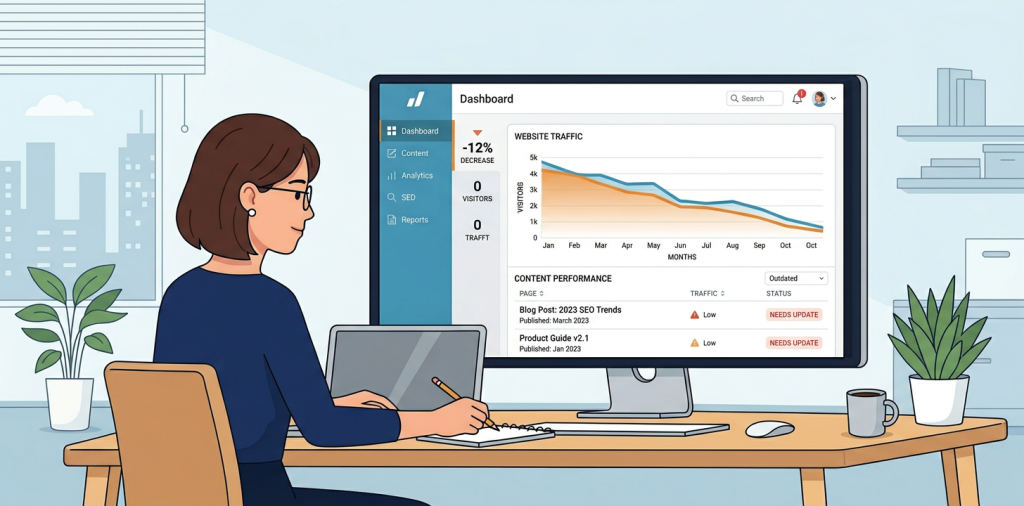
What is fixing content decay, and why does it matter so much right now? It’s the process of finding pages that used to perform well, diagnosing why they slipped, and updating them so they can win back rankings, clicks, and conversions. If you’ve noticed traffic slowly fading on blog posts, landing pages, or product pages, you’re not alone, and you’re not doomed.
The good news is that content decay is usually fixable without starting from scratch. In most cases, the page already has equity, backlinks, or relevance. It just needs the right refresh, better internal linking, and a tighter match to what searchers want today.
What Content Decay Looks Like
Content decay happens when a page gradually loses visibility over time. That drop can show up as fewer impressions, lower click-through rates, weaker rankings, or reduced conversions.
Here are the most common signs:
- A post that used to sit on page one is drifting to page two or lower
- Organic clicks are down even though the page is still indexed
- The content still ranks, but it no longer gets the same engagement
- A landing page is outdated and no longer matches search intent
- Competitors have published fresher, deeper, or better-structured content

Why Content Decay Happens
The web moves fast. Search intent changes, competitors improve their content, and Google keeps refining what it rewards. Even strong pages can fade if they stop answering the current version of the query.
Common causes include:
Outdated information
Stats, screenshots, tools, pricing, examples, and recommendations age quickly. If the page feels stale, both users and search engines notice.
Weakening search intent match
A page that once answered the query well may no longer fit what searchers expect. For example, a query can shift from informational to commercial, or from beginner to advanced.
Content cannibalization
Multiple pages may compete for the same topic, splitting relevance and authority. That often causes all of them to underperform.
Technical and UX issues
Slow performance, poor mobile formatting, broken links, and thin internal linking can all make a page less competitive.
Stronger competing pages
If competitors publish more complete, clearer, or more trusted resources, your page can slip even if it hasn’t changed.
How To Diagnose Content Decay
Start by identifying the pages that actually need attention. Don’t refresh everything. Focus on pages with real decline and meaningful potential.
Review traffic trends
Look at organic clicks, impressions, and average position over the last 3 to 12 months. A slow, steady drop is a classic decay pattern.
Check rankings by keyword
See which queries have slipped and whether the page still matches the primary intent. Sometimes the page is ranking for the wrong terms entirely.
Compare against current competitors
Ask a simple question, what are the top-ranking pages doing better than yours? You’re looking for gaps in depth, clarity, freshness, format, and trust signals.
Look at engagement and conversion data
If users land on the page but leave quickly, the issue may be the content itself, not just rankings. Low scroll depth, low time on page, or weak conversions can all point to decay.
Audit internal links
A page with very few internal links can quietly lose importance over time. Sometimes a quick linking update makes a noticeable difference.
A Simple Framework For Fixing Content Decay
The best way to think about fixing content decay is as a refresh, not a rewrite. You want to improve the page while preserving what already works.
1. Protect the page’s original value
Before changing anything, identify the current target keyword, top-performing sections, and any backlinks pointing to the page. Keep the strongest parts intact.
2. Update facts and examples
Replace old screenshots, stats, product mentions, and recommendations. If the page references outdated tools or processes, bring them current.
3. Expand missing sections
Add the questions users are now asking. This is especially important for early-stage businesses that need content to educate, build trust, and capture demand.
4. Improve structure and readability
Use shorter paragraphs, clearer headings, and better formatting. Add quick summaries, bullets, and examples so readers can scan and still find value.
5. Strengthen internal linking
Link from relevant supporting pages into the decayed page, and from the decayed page to related pages. This helps both users and crawlers understand topical relationships.
6. Refresh the title and meta description
A better title can improve click-through rate even before rankings move. Make sure the result looks current, specific, and useful.
7. Recheck technical basics
Make sure the page loads quickly, works on mobile, and has clean indexing signals. A content fix is stronger when technical SEO is not holding it back.
What To Update First On A Decayed Page
If you’re short on time, focus on the changes that usually create the biggest lift.
- Rewrite the intro so it matches today’s search intent
- Update the H2s to cover the full topic more clearly
- Add a comparison table, checklist, or FAQ section
- Improve one or two weak sections rather than editing randomly
- Add internal links from high-authority pages on your site
- Add proof, such as case studies, expert insights, or firsthand experience
That last point matters more than many teams realize. Search engines and users both respond better when the page feels grounded in real value, not just broad advice.
How To Prevent Future Decay
Fixing content decay is important, but prevention is where the real payoff comes from. A simple content maintenance process can save you from repeated traffic losses.
Build a content refresh schedule
Review top pages every 3 to 6 months, especially for fast-changing topics. High-value pages should never be left untouched for years.
Track leading indicators
Don’t wait for traffic to collapse. Watch impressions, ranking drift, click-through rate, and engagement. Those are often the first signs of trouble.
Maintain topical clusters
Support your main pages with related articles, guides, and comparison pages. A stronger internal content network helps protect rankings.
Keep improving conversion paths
A page can recover traffic and still fail commercially if the next step is unclear. Make sure every important page points to a relevant conversion action.
Use an audit process
A structured website audit or SEO audit helps you spot decay, content gaps, and technical issues before they become bigger problems. For teams working on AI visibility too, an AI search optimization review can also show whether your pages are being summarized clearly by tools like ChatGPT and Gemini.
Fixing Content Decay For Different Site Types
Not every site should fix decay the same way. The strategy should match the business model.
SaaS websites
Focus on feature pages, comparison pages, and use-case content. These pages often decay when competitors publish sharper positioning or fresher examples.
eCommerce sites
Update product category pages, buying guides, and seasonal content. Stronger copy, better filters, and fresh internal links can help a lot.
Local business websites
Refresh service pages, location pages, and FAQs. Make sure content reflects current offerings, service areas, and trust signals.
Bloggers and affiliate sites
Update product recommendations, screenshots, and user intent alignment. In many cases, a content refresh performs better than a brand-new post.
Agencies and content teams
Create a repeatable system for identifying pages with lost traffic, ranking drops, or weak conversions. That makes content optimization much easier to scale.
Common Mistakes To Avoid
A bad refresh can make a page worse, not better. Here’s what to avoid.
- Changing the topic too much and losing relevance
- Removing useful sections that were helping the page rank
- Updating only the intro and ignoring the rest of the page
- Adding fluff instead of answers
- Forgetting to improve internal links and title tags
- Publishing a refreshed page and never monitoring the results
The goal is not to make the content longer for the sake of it. The goal is to make it more useful, more current, and more aligned with what searchers want now.
FAQ
How do I know if a page has content decay?
Look for gradual traffic loss, ranking drops, declining impressions, or lower engagement on a page that used to perform well. If the page still has value but is losing visibility, decay is likely.
Should I update or rewrite a decayed page?
Usually, update first. If the page has backlinks, history, or relevance, a refresh often performs better than starting over. Rewrite only when the topic, structure, or intent mismatch is too severe.
How often should I review older content?
For most businesses, every 3 to 6 months is a smart cadence. Fast-moving industries may need more frequent checks.
Does internal linking really help recover rankings?
Yes, especially when the page already has good content but weak site support. Internal links help distribute authority and clarify topical relationships.
Can fixing content decay improve conversions too?
Absolutely. Better structure, stronger calls to action, updated information, and clearer intent matching often improve lead generation and sales, not just rankings.
What tools help with content decay audits?
Use analytics, search performance data, rank tracking, crawl tools, and content gap analysis. A full website audit gives you the clearest picture of what needs attention.
Start Fixing The Pages That Already Deserve To Win
If you want faster growth, don’t only chase new content. Look at the pages that once worked and give them a better shot at ranking again. A smart refresh can recover traffic, improve conversions, and create momentum without the cost of starting from zero.
If you want help finding those opportunities, an SEO audit or content decay review can show you exactly where to start. Visit AuditSky to uncover pages worth refreshing and turn fading content into growth again.
Conclusion
Content decay is frustrating, but it’s also one of the clearest opportunities in SEO. You already have proof that the page had potential, so the task is to make it relevant again, useful again, and easier to trust.
Start with the pages that matter most, update them with intent, and keep a simple review process in place. That’s how you turn old content into fresh organic traffic again.